
This post contains affiliate links. If you buy through them, we may earn a commission at no extra cost to you. It never changes which tools we recommend or how we rank them.
The short answer: systeme.io for video creators works for the second half of a video creator’s job: turning finished videos into income. It puts signup pages, an email list, automation, checkout, course delivery, webinars, and memberships in one dashboard, so a viewer can move from one useful video to subscriber to buyer without the creator copying names between systems. It does not record videos, edit footage, or generate clips for you. This guide judges it as a selling and teaching system for people who already make videos, not as a video maker, so you can see exactly where it helps and where it does not.
A video creator has two jobs, and only the first one gets most of the praise. The first job is making videos worth watching: planning, recording, editing, and finishing lessons, tutorials, and demonstrations that teach something real. The second job is quieter and just as decisive: making sure finished videos reach buyers, stay in touch with the people who watched them, and turn some of those viewers into paying students and repeat customers. A strong video with no signup form attached sends viewers away and keeps none of them. A useful free lesson with no course behind it teaches once and earns nothing. A full course with no email sequence behind it depends entirely on viewers remembering to come back on their own.
Systeme.io for video creators is a claim about that second job. It is an all-in-one online business platform, and its value for video creators comes from joining the steps that usually sit apart: watch, capture, follow up, sell, deliver, and keep. When the signup page, the list, the email sequence, and the sale share one contact record, a viewer’s journey stops depending on the creator remembering to send the next message by hand. That is the whole idea, and it is worth testing plainly, because a platform that only adds another dashboard to a creator’s week has saved nothing.
This post is not a list of video making apps. It is a deep look at one platform, judged the way a working video creator would judge it: what happens to a video after it is finished, what a ladder from free viewer to repeat buyer looks like rung by rung, what it costs, where it falls short, and who should wait before adopting it.
- Free plan: $0, up to 2,000 contacts, 3 sales funnels, unlimited emails
- Paid plans: $17, $47, and $97 per month
- Transaction fees from the platform itself: 0% on every plan (payment processors charge their own fees)
- Video creator jobs in one dashboard: signup pages, email sequences, selling, course delivery, webinars, memberships, your own affiliate program
First, Say Plainly What It Is Not
Honesty here saves a video creator a wasted signup. Systeme.io for video creators is not a video generator. It will not create a clip from a prompt, edit your footage, add captions to a recording, or design a thumbnail. If the problem you need solved today is making videos, this platform does not solve it, and this post does not pretend otherwise.
It is also not a video sharing site in the old sense. A sharing site shows videos and hopes someone follows. This platform is built to move a viewer forward: from watching, to signing up, to buying, to coming back. That difference matters, because video creators often buy the wrong kind of tool for the problem they actually have. A creator with a hard drive full of finished lessons and no students does not need another place to store videos. A creator with steady viewers and no system to keep them does not need more views. They need a path from viewer to subscriber to buyer that runs even on weeks when recording and editing take all the time.
Keep that test in mind through the rest of this post. Every feature below is judged by one question: does it help finished videos reach more of the right students, and does it do so without adding manual work the creator will abandon in a month?
The Video Income Ladder
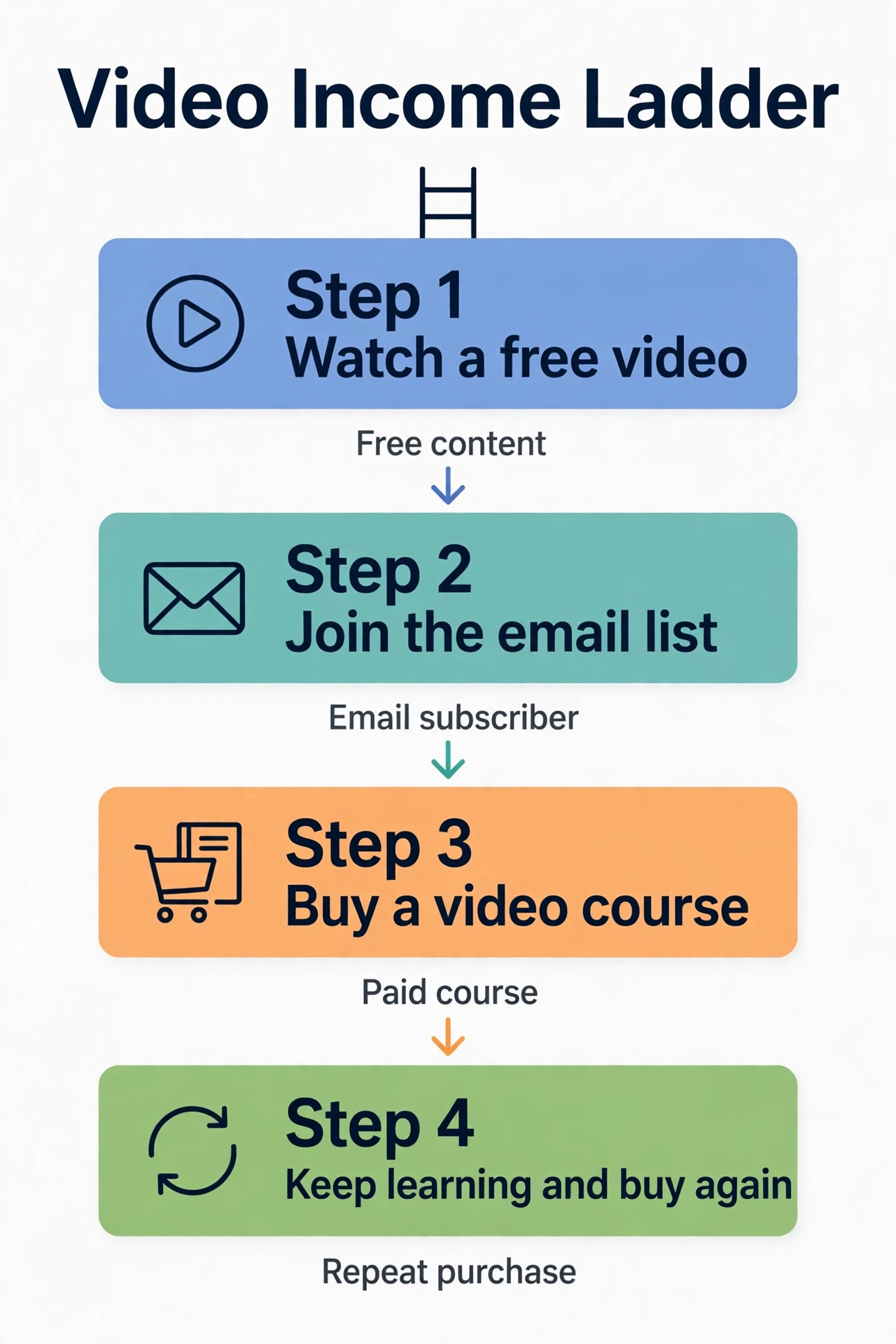
Most advice about selling videos stops at “make a course.” A course is only one rung. A video business is a ladder, and each rung serves a different viewer, at a different price, with a different amount of the creator’s time attached. The infographic below shows that ladder in four steps. The rungs that follow explain what each rung must do, and what to leave off it.
Rung 1: The free video, where a viewer decides in seconds
The free video has one job: prove the teaching is worth a closer look. Show one clear result, teach one useful step, and end with one clear next step. A viewer should understand within seconds what kind of videos you make and who they are for. Put a signup offer at the end of the free video path, not only a comment box. A comment box asks a stranger to start a public conversation. A signup offer gives them something useful first, such as a free sample lesson, a short checklist, or a starter worksheet, in return for an email address. That exchange is what turns a passing viewer into a contact you can reach again.
The limit to know: page design flexibility is narrower than a dedicated page builder. If your pages must look like a design studio built them, with custom layouts no template can match, you will feel that limit. If your pages need to be clear, fast, and easy to update, the templates cover the job. Search visibility still depends on the work itself: clear page titles, useful headings, and honest descriptions of each course. No platform setting replaces videos worth watching.
Rung 2: The email list, so viewers do not vanish
Every video creator needs a simple exchange: something useful in return for an email address. The funnel builder provides drag-and-drop pages for this, with templates to start from, including opt-in pages and thank-you pages in the same path. The practical point is the path, not the page. A viewer should move from the offer to the signup form to the thank-you page without hitting a dead end, and the contact they just gave should land straight on the list, tagged by which video or offer brought them in.
That tag is what makes every later rung possible, because it tells you what the person asked for. A list with no tags is a list you cannot speak to properly, and an unsegmented list gets generic messages that feel generic because they are generic. Tag by subject, by video, and by purchase, so a beginner does not receive advanced offers, and a buyer stops receiving sales messages for a course they already own.
Email marketing inside the platform covers two kinds of sending. Broadcasts go to the whole list or a segment at once, for new lessons and announcements. Sequences send themselves over days, so a new subscriber gets a welcome email, then a useful follow-up, then an invitation to related teaching, on a schedule set once. For video creators, the welcome sequence should point back to video, not only talk about it. A good sequence might run like this: first, the promised sample and a short note about what it teaches; second, one strong free lesson with the story behind a single example; third, a practical tip the subscriber can use on their own work; fourth, an invitation to the matching paid course. Each email carries a reason to stay: a lesson, a tip, or a useful file.
The free plan limit matters here, so read it before you plan: public pricing summaries list 1 email campaign and 1 automation rule on the free plan, with unlimited email sends. That is enough to run one real welcome sequence and prove the system, but a creator running several sequences for several courses at once will outgrow the free plan quickly. Paid plans raise those limits, and that upgrade point is the honest moment to pay, not before.
One setup caution from public review summaries: sending email campaigns requires an email address on your own domain. Set that up before launch week, not during it, so a small setup step does not delay a sequence that is otherwise ready.
Rung 3: The paid course, where teaching becomes a product
When the teaching leads to an offer, the platform provides sales pages and checkout pages inside the same funnel, and a course builder with modules and lessons for video lessons, text, downloadable resources, quizzes, and drip scheduling. A sales page for a video course needs four things, and only four: the result the student will reach, stated plainly; what the buyer receives, stated plainly, including lesson count, lesson length, and included files; the price and what is included; and one clear button. Everything else is decoration, and decoration that pushes the result below the fold costs sales.
Write the sales page around one course, not your whole catalogue. A buyer who lands on a page for a beginner course should not have to hunt through advanced lessons, workshops, and memberships to find it. One page, one offer, one buyer, one button. State the course structure plainly: how many modules, what each module teaches, and how long a student should allow. A buyer who knows the path buys with more confidence than a buyer who only sees a promise.
A buyer who pays for a course gets access in the same motion as payment, which removes a whole class of support messages that begin with “I paid, where is my course?” A buyer who purchases a course lands on the buyer list in the same motion, with no export step in between. That single motion matters for video creators because it closes the measurement loop. You can count, for one offer, how many viewers entered, how many reached the offer, and how many bought. Without that count, every opinion about what students want is a guess. With it, you can test one change at a time: a clearer headline, a stronger first lesson, a shorter signup form, a better welcome email, a different offer order.
Check how your videos are stored on the current course builder before launch week, because public summaries differ on storage details. The teaching structure is the stable part: modules, lessons, drip control, quizzes, and automatic access on purchase. Confirm the storage method for your own videos before you promise it to students, and build your lessons to match it.
Rung 4: The repeat buyer, where one sale becomes a habit
The last rung in the ladder is the one most creators skip. After purchase, the platform offers membership areas and communities on paid plans, plus ongoing email updates for new lessons. Neither job matters on day one. Both matter when one course sells and you want students to return for the next course, the next workshop, and the next series, rather than starting from zero each time.
Webinars belong on this rung too, not on launch week. On the Webinar plan, evergreen webinars let a recorded teaching session run on a schedule, with registration and reminder emails, so a creator can teach once and invite new viewers again and again. A webinar that repeats a free lesson and invites viewers to the full course is a strong bridge between Rung 2 and Rung 3. A webinar built before any course sells is a stage with no product behind it. Build the course first, prove it sells, then add the webinar that points to it.
Your own affiliate program, available on the platform, belongs to a later stage as well. When one course works, students who love the teaching can recommend it and have their referrals tracked inside the same system. Do not build an affiliate program before you have a course that sells on its own. An affiliate program amplifies a working offer. It does not fix an offer nobody buys.
Keeping students is cheaper in effort than finding new ones, but only if the keeping is genuine: new lessons on a steady rhythm, replies to real questions, and offers that follow from the teaching students already liked. A membership with no new lessons inside it is an empty room. A student list that only hears sales messages is a list that will shrink. The system can carry the messages. Only the creator can give students a reason to stay.
From Episodes to a Course: The Conversion Map
Video creators often ask where a course comes from. The honest answer is that it usually comes from videos you already made, rearranged into a teaching order with gaps filled. The table below shows that conversion for a typical teaching series. It is not a template to copy word for word. It is a method: group free episodes by the problem they solve, turn each group into a module, and add the missing pieces a paying student needs.
| Free episode group | Becomes this course module | What you must add for paying students | What you must not add |
|---|---|---|---|
| Three beginner episodes on one skill | Module 1: Foundations | A short practice task after each lesson, and one worked example from start to finish | A second beginner course inside the first module |
| Two common mistake episodes | Module 2: Mistakes and fixes | A checklist students can use while they practise, and before and after examples | A long theory lecture with no practice |
| Two intermediate episodes | Module 3: Putting it together | A full guided project that uses every skill from Modules 1 and 2 | Five extra tools the student does not need yet |
| One question and answer episode | Module 4: Questions, answers, and next steps | Answers grouped by problem, plus a clear next course or workshop to take next | Unanswered questions left as homework |
| No free episode yet | A short bonus lesson only if students ask for it | One lesson that fills a gap students named in feedback | A whole new module built on a guess |
The discipline in this table is what it leaves out. A course is not a pile of every video you ever made. It is a path from a starting problem to a finished result, with practice at each step. Start with the module that matches videos you already have. A creator with strong beginner videos starts with Module 1. A creator who already answers the same questions again and again starts with Module 4. The platform can carry the whole course, but a creator who builds five modules at once usually finishes none of them well.
Pricing honesty belongs here too. This post gives no price for your course, workshop, or membership, because the right price depends on your costs, your audience, and the result you teach. What the platform changes is not your price. It changes how much of each sale you keep after platform fees, and how little manual delivery work each sale creates. The platform itself charges 0% transaction fees on every plan, while payment processors still charge their own processing fees, as they do everywhere. Judge the real cost as platform price plus processor fees, not platform price alone.
A 14 Day Launch Calendar
A course launch fails most often for boring reasons: the signup page was not tested, the welcome emails were written last, or the sales page went live before the lessons were ready. The calendar below gives each job a day, so launch week is a checklist, not a rush. Adjust the days to your own pace, but keep the order: lessons first, pages second, emails third, traffic last.
| Days | Job for those days | Done means |
|---|---|---|
| Days 1 to 2 | Choose one course and one result | One sentence states what the student can do after the course, and one list names its modules |
| Days 3 to 4 | Finish or tidy the lessons | Every lesson plays from start to finish, and every file a lesson promises is attached |
| Days 5 to 6 | Build the signup page and free sample | A viewer can sign up, reach the thank-you page, and receive the sample with no manual step |
| Days 7 to 8 | Write the welcome sequence | Four emails are written, tested in your own inbox, and tagged by subject |
| Days 9 to 10 | Build the sales page and checkout | One page, one offer, one price, one button, tested with a real purchase path |
| Days 11 to 12 | Set up the course area and access | A test buyer pays, receives access, and lands on the buyer list in the same motion |
| Day 13 | Invite a small test group | Ten or fewer real viewers go through the whole path, and every break is fixed |
| Day 14 | Open to the full list | One announcement email goes to the tagged segment that asked for this subject, not to the whole list |
The calendar also shows where not to spend launch week. Do not build a membership on Day 3. Do not build an affiliate program on Day 5. Do not record a webinar on Day 7. Each of those jobs belongs after one course sells, when you know which subject students actually pay for. Launch week is for one course, one list, one sequence, and one sales page, measured stage by stage.
Pricing, Plan by Plan
Prices below come from public pricing summaries checked in October 2026 and from the site’s own pricing check in November 2026. Check the official pricing page before you pay, because prices and plan limits change over time. Annual billing is described in those summaries as giving two months free.
| Plan | Price per month | Contacts | Sales funnels | Courses | What it adds for video creators |
|---|---|---|---|---|---|
| Free | $0 | Up to 2,000 | 3 | 1 | One blog, one email campaign, one automation rule, unlimited emails, 0% platform transaction fees |
| Startup | $17 | Up to 5,000 | 10 | 5 | More blogs and courses, more automation rules, more custom domains |
| Webinar | $47 | Up to 10,000 | 50 | 20 | Evergreen webinars, larger lists, larger funnel capacity |
| Unlimited | $97 | Unlimited | Unlimited | Unlimited | All limits lifted, plus sub-accounts and free migration on the top plan |
Read the price the right way. The free plan is genuinely usable for one course and one funnel, not a demo that expires. The $17 plan is the first real step up, and it arrives when course, funnel, or automation limits start blocking a funnel that already works. The $47 plan is the webinar plan, and it earns its price only when webinars are how you sell. The $97 top plan is still below the entry price of several separate tools bought one by one, but that comparison only matters if you actually use at least three of the jobs in this post. One job alone does not justify an all-in-one price.
Pros and Cons, Plainly
| Pros | Cons |
|---|---|
| Signup pages, email, automation, selling, and course delivery share one contact list | Page design is less flexible than a dedicated page builder |
| Free plan covers a full first course funnel with no credit card needed | Free plan limits (one campaign, one automation rule) are outgrown fast by creators running several courses at once |
| No-code setup: one creator can build a funnel without a developer | Automation gets tight when many rules stack together |
| 0% platform transaction fees on every plan | Reporting is solid for funnel stages, not deep enterprise analytics |
| Paid plans stay low compared with buying each job as a separate subscription | Integration library is smaller than larger platforms, centered on payments |
| Reusing a funnel and sequence for the next course costs little extra setup | Not a video maker, not an editor, and not a substitute for making videos |
| A buyer gets course access in the same motion as payment | Not built for large teams, complex pipelines, or multi-client agency dashboards |
| Evergreen webinars on the Webinar plan repeat one teaching session on a schedule | Webinar and community features sit on paid plans, not on the free plan |
The pattern in that table is consistent across public review summaries: breadth and simplicity are the strengths, depth and design freedom are the trade-offs. A creator who needs one connected path from viewer to student will feel the strengths. A creator who needs the deepest version of any single job, or a tool that makes videos, will feel the limits.
Who It Fits, and Who Should Wait
Fit is better judged by finished videos and routine than by audience size alone.
It fits well if you are a video creator with finished lessons and a small but real audience. You publish regularly, people respond to the teaching, and you want those people on a list you control, with a simple way to sell a course, a workshop, or a membership when it is ready. It also fits if you teach what you make, and want the lesson, the sale, and the follow-up in one place.
It fits well if follow-up is your known weak spot. You already get viewers, but too many watch once and vanish, or wait too long for the next lesson. A platform that automates the second, third, and fourth message, and the delivery step, attacks your actual problem, not a problem you imagine having.
Wait if your main need is making or editing videos. If you need a tool that records, edits, captions, or generates video, this platform will disappoint you, because that is not what it is built to do. Solve the making need with a making tool, and judge this platform separately, on selling and teaching.
Wait if you need design-led pages. If your pages must look like a design studio built them, with custom layouts no template can match, start with a dedicated page builder and accept the extra cost and stitching work. Forcing an all-in-one platform into a design job it was not built for wastes the money it was supposed to save.
Wait if you have no finished videos and no viewers yet. No platform creates viewers. If you have nothing clear to teach and nobody watching it yet, fix the making habit and find the first viewers first. Then a selling tool has something real to capture and follow up on.
Common Mistakes Video Creators Make
Showing everywhere, capturing nowhere. A video shared widely with no signup offer attached sends viewers away and keeps none of them. Every video that matters should carry one clear next step for the viewer who liked it.
Giving the full course away free. A free sample should be useful and small: one sample lesson, one checklist, or one starter worksheet. The full course, the full workshop, and the full membership are the paid products. A freebie that replaces the paid product leaves nothing to sell.
Offering five courses at once. Five vague offers confuse a buyer. One clear course, tied to one result, converts better and is easier to teach well.
Writing the welcome emails last. The emails are the funnel, not an afterthought to the pages. Write them before you drive traffic, and test them on your own inbox first.
Tagging nothing. A list with no tags is a list you cannot segment, and an unsegmented list gets generic messages. Tag by subject, by video, and by purchase, so the next message fits the viewer who receives it.
Measuring views instead of stages. A thousand views with no stage counts tells you nothing. Count entries, offer views, and purchases for one funnel, and fix the biggest drop first.
Paying before the free limit bites. The free plan exists to prove the funnel on real work. Upgrade when a limit blocks a funnel that already works, not when a feature list looks impressive.
Selling before trust is earned. A new subscriber who receives a hard offer in the first email has no reason to stay. Give the promised sample, prove useful twice, and only then invite them to buy.
Launching the webinar first. A webinar with no course behind it is a stage with no product. Build the course, prove it sells, then add the webinar that points to it.
Frequently Asked Questions
What is systeme.io for video creators?
It is an all-in-one business platform that covers the path from free video viewer to subscriber to buyer: signup and funnel pages, email marketing, automation rules, checkout, course selling, webinars on the Webinar plan, memberships, and your own affiliate program, all sharing one contact list. It is a selling and teaching system, not a video maker or editor.
Is systeme.io for video creators good for new creators?
Yes, if the creator already has finished videos to show and teach with. The free plan lets a new creator run one funnel and one welcome sequence before paying. If the creator has no finished videos yet, the first step is making and publishing regularly, and the selling system can wait until viewers arrive.
Does systeme.io for video creators make videos for me?
No. It does not record videos, edit footage, add captions, or generate clips. It shows, captures, follows up, sells, and delivers the videos you create. Creators who need video making help should judge that need separately from the selling and teaching system described here.
Is there a free plan?
Yes. The free plan costs $0, needs no credit card to start, and covers up to 2,000 contacts, 3 sales funnels, one blog, one course, one email campaign, one automation rule, and unlimited emails, with 0% platform transaction fees. Check the official pricing page for current limits before you build.
Can I sell video courses with systeme.io for video creators?
Yes. Sales pages and checkout sit in the same funnel as the signup pages and the emails, and courses sell with modules, lessons, drip scheduling, and quizzes in the same dashboard, so a buyer pays, receives access, and lands on the buyer list in the same motion, with no manual delivery step.
Can I run webinars with systeme.io for video creators?
Yes, on the Webinar plan at $47 per month in public pricing summaries. Evergreen webinars let a recorded teaching session run on a schedule, with registration and reminder emails. Check which plan includes webinars before you promise them to students.
Can I build a membership with systeme.io for video creators?
Yes, on paid plans that include membership areas. A membership can give returning students new lessons on a steady rhythm, plus ongoing email updates for new courses. A membership with no new lessons inside it will not keep students, so build the lesson rhythm first.
Can I sell video workshops with systeme.io for video creators?
Yes. A single workshop sells the same way a course sells: one sales page, one price, one checkout, and access or joining details delivered in the same motion as payment. Start with one workshop tied to one result, and add more only after the first one sells.
What does systeme.io for video creators cost?
There is a free plan at $0. Paid plans are $17, $47, and $97 per month in public pricing summaries, priced by contacts and features, with annual billing described as two months free. Prices and limits change, so check the official pricing page before buying.
Conclusion
Systeme.io for video creators earns its place when the gap between finished videos and a paying student is where your work stalls. One dashboard covers the signup page, the email follow-up, the checkout, the course access, the webinar, and the membership, and one contact list ties them together so no viewer waits on a manual task that never happens. It will not make your videos, it will not edit your footage, it will not design award-winning pages, and it will not create viewers where none exist. But for a creator with finished videos, a small real audience, and a clear course to sell, it is the simplest complete selling and teaching system at the lowest starting price.
Start with one course, one clear result, one free sample, and one welcome sequence measured stage by stage. In a few weeks you will know, from your own funnel numbers rather than a feature list, whether systeme.io for video creators earns its place in your working routine.
Leave a Reply